Why 90% of AI Video Creators FAIL in 2026 (And How GeminiGen AI Fixes It)
Let me ask you something. Have you ever spent hours trying to make a video — scripting, recording, editing, adding music — only to end up with something that looks completely average? You’re not alone.
The world of video content in 2026 is moving faster than most creators can keep up with. Every day, millions of videos are published across YouTube, TikTok, Instagram, and LinkedIn. The bar for quality is rising. And yet, most creators are still doing things the hard way.
Here’s the good news: AI Video Generator technology has matured dramatically. And one platform that’s turning heads in 2026 is GeminiGen AI — a multi-model video generation studio that puts the power of Google’s Veo, OpenAI’s Sora, xAI’s Grok, and more into a single, clean dashboard.
But does it actually deliver? Or is it just another overpromising tool that looks better in the demo than in real life?
I’ve gone through GeminiGen AI’s Studio in detail — every tab, every provider, every setting — and I’m going to give you the full, honest picture. No fluff. No exaggeration. Just real, actionable information.
Also Read: 7 Best Sora AI Alternatives: Create Free Pro-Level Videos in 2026
What Is GeminiGen AI?
GeminiGen AI is a cloud-based AI Video Generator platform that lets you create professional-quality videos directly from text prompts — using some of the most powerful AI models in the world today.
What makes it genuinely different from most competitors is this: instead of building one proprietary video model and calling it a day, GeminiGen AI acts as a unified multi-model hub. It brings together world-class AI engines — Google Veo, OpenAI Sora, xAI Grok, Bytedance, and Meta AI — all accessible from one dashboard.
Think about what that means. You’re not locked into one AI’s style or limitations. You can choose which model powers your video based on the type of content you need.
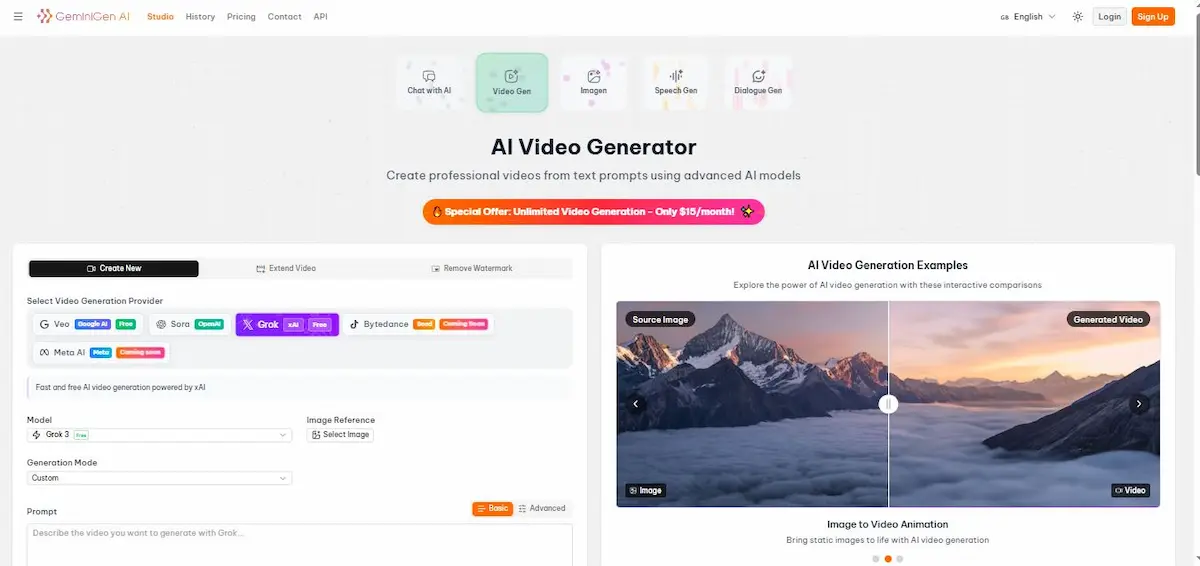
The GeminiGen AI Studio — What You See When You Log In
When you open GeminiGen AI, you land in the Studio. Across the top navigation, you’ll find: Studio, History, Pricing, Contact, and API — clean, minimal, and focused. No cluttered menus. No overwhelming options upfront.
Right at the center of the Studio are five core tools:
| Tool | What It Does |
|---|---|
| 💬 Chat with AI | Conversational AI assistant for creative guidance |
| 🎬 Video Gen | The main AI Video Generator — text to video |
| 🖼️ Imagen | AI image generation |
| 🔊 Speech Gen | AI voiceover and speech synthesis |
| 💬 Dialogue Gen | AI-powered dialogue and script generation |
Each tool has a distinct purpose. But for this review, we’re focusing on the star of the show: Video Gen — the platform’s flagship AI Video Generator.
The headline on the Video Gen page says it simply: “Create professional videos from text prompts using advanced AI models.”
And as we’ll explore, it actually delivers on that promise.
How GeminiGen AI’s Video Generator Works
Here’s where things get exciting. GeminiGen AI doesn’t use just one AI model for video generation. It gives you a choice of multiple world-class AI providers, each with its own strengths.
Once you’re in the Video Gen section, you’ll see three main action tabs at the top:
- ➕ Create New — Generate a brand new video from a text prompt
- 🔁 Extend Video — Take an existing video and extend its length using AI
- ❌ Remove Watermark — Clean up videos by removing watermarks automatically
These three features alone make GeminiGen AI a comprehensive video production tool, not just a basic text-to-video generator.
Selecting Your Video Generation Provider
This is the most unique and powerful part of GeminiGen AI’s setup. Under “Select Video Generation Provider,” you’ll find five options — and this is exactly what separates GeminiGen AI from every other platform in the market.
Let’s break down each provider in detail.
The AI Video Generation Providers
Google Veo — The Cinematic Powerhouse (Free)
Provider badge: Google AI | Free ✅
Google Veo is Google DeepMind’s flagship video generation model, and it’s one of the most sophisticated text-to-video systems ever built. When it was first announced, it shocked the industry with its ability to produce cinematic, high-resolution video sequences that look genuinely filmed — not animated.
What makes Veo special?
Google Veo understands cinematic language. You can write prompts like “slow pan across a misty mountain range at golden hour, 4K, documentary style,” and it will actually interpret that correctly. The motion is smooth. The lighting is realistic. The depth and perspective feel natural.
For creators who need visually rich content — travel videos, nature documentaries, lifestyle content, brand films — Veo is extraordinary.
The fact that it’s available FREE on GeminiGen AI is genuinely remarkable. Normally, access to Google Veo requires API access with significant usage costs. GeminiGen AI has integrated it into a beginner-friendly interface at no extra charge for platform subscribers.
Best used for:
- High-quality cinematic promotional videos
- Nature, travel, and landscape content
- Brand storytelling and commercial ads
- YouTube intros and highlight reels
OpenAI Sora — The Storytelling AI
Provider badge: OpenAI
OpenAI’s Sora made waves when it was first revealed, and for good reason. Sora doesn’t just generate video — it understands narrative. It can maintain consistency across a longer video sequence, meaning characters, objects, and environments look the same from one shot to the next.
This is actually one of the biggest challenges in AI video generation. Most models produce great individual scenes but fall apart when you need continuity. Sora was specifically built to solve this problem.
What makes Sora special?
Sora generates videos that tell a story with visual logic. The physics feel believable. Motion follows natural rules. And the overall output has a sophisticated, polished quality that holds up even when viewed on a large screen.
For businesses creating explainer videos, product showcases, or short narrative films, Sora brings a level of production quality that was previously only achievable with professional crews and post-production teams.
Best used for:
- Brand story videos and company narratives
- Product demonstration videos
- Short narrative or cinematic ads
- Educational explainer content requiring scene consistency
Grok by xAI — The Fast & Free Generator (Currently Active)
Provider badge: xAI | Free ✅
Model shown in screenshot: Grok 3 (Free)
Description shown: “Fast and free AI video generation powered by xAI.”
Grok is Elon Musk’s xAI company’s AI model, and it’s currently the default active provider when you open GeminiGen AI’s Video Gen tool. There’s a very good reason for this: it’s fast, it’s free, and it’s surprisingly capable for everyday video creation tasks.
Grok 3 is the latest iteration, and GeminiGen AI gives you full access to it without any additional cost on top of your subscription.
What makes Grok special?
Speed. Grok is optimized for quick generation, making it ideal when you need to produce multiple video drafts quickly, test different prompts, or iterate on ideas without waiting. For content creators who are publishing daily or multiple times per week, speed matters enormously.
While Grok may not produce the same level of cinematic realism as Veo or the narrative consistency of Sora, it’s an excellent workhorse for social media content, YouTube Shorts, and quick marketing videos.
Generation Mode shown: Custom — meaning you can fine-tune exactly how the video is generated, rather than being limited to preset outputs.
Best used for:
- Social media content (TikTok, Instagram Reels, YouTube Shorts)
- Rapid prototyping and concept testing
- Daily content creation at scale
- Quick marketing and promotional clips
Bytedance — Coming Soon (Beta)
Provider badge: Beta | Coming Soon
Bytedance — the company behind TikTok — has been developing its own AI video generation technology. GeminiGen AI has already integrated Bytedance’s model into its platform, though it’s currently in beta and not yet publicly available.
Why does this matter? Because Bytedance’s AI is trained on an enormous dataset of short-form vertical video content — the most viral, most engaged-with format in social media history. When Bytedance’s video AI becomes available through GeminiGen AI, it will likely be exceptionally well-optimized for TikTok-style and Reels-style content creation.
If you’re a short-form content creator, keep your eyes on this one.
Meta AI — Coming Soon
Provider badge: Meta | Coming Soon
Meta — the company behind Facebook, Instagram, and WhatsApp — has been heavily investing in generative AI, including video generation research under its Fundamental AI Research (FAIR) division.
Meta AI’s video generation capabilities, when made available on GeminiGen AI, will likely be particularly strong for social media video formats aligned with Instagram, Facebook, and Threads. If Meta’s AI understands engagement patterns from those platforms natively, it could produce content that performs better algorithmically on those networks.
Another integration worth watching closely as 2026 progresses.
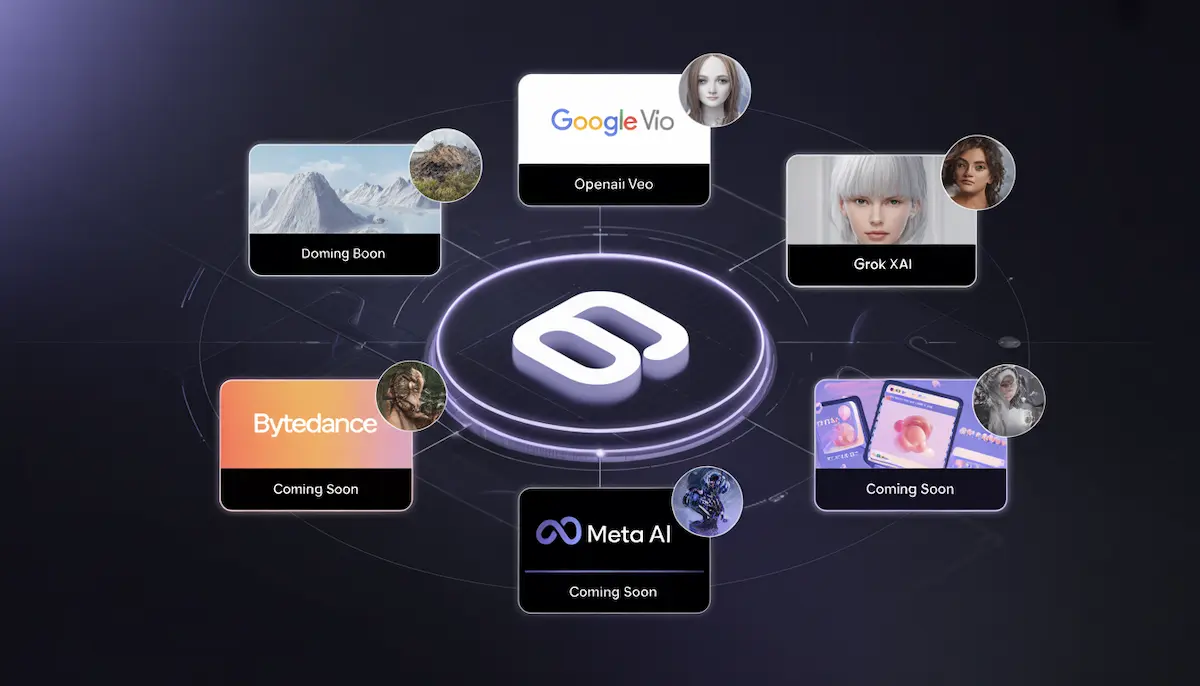
Image to Video Animation — A Standout Feature
On the right side of the GeminiGen AI Studio, you’ll notice a section titled “AI Video Generation Examples” with a beautiful interactive comparison — a static mountain image on the left transforming into a stunning animated video on the right.
This isn’t just a demo. It’s showcasing one of GeminiGen AI’s most powerful features: Image to Video Animation.
What Is Image-to-Video Generation?
Image-to-video animation takes any static photograph or illustration and brings it to life with realistic motion. The mountain scene in the example shows clouds moving across the peaks, subtle atmospheric depth, and natural-looking environmental animation — all generated from a single still image.
This has enormous practical applications:
- Turn your product photography into animated ads
- Animate old photos for nostalgic or storytelling content
- Bring illustration or artwork to life for creative projects
- Create animated backgrounds for video presentations
- Transform landscape photography into cinematic video content
The Image Reference option on the left panel (labeled “Select Image”) allows you to upload any image and use it as the visual foundation for your video generation — combining the power of your reference visual with your text prompt for highly controlled, custom results.
All the Key Features of GeminiGen AI — Explained Section by Section
Feature 1: Multi-Model Provider Selection
As covered in detail above, GeminiGen AI is the only platform currently offering access to Google Veo, OpenAI Sora, and Grok (xAI) in one unified dashboard. This alone makes it an extraordinary value. You’re essentially getting subscriptions to multiple world-class AI systems for one flat monthly fee.
Feature 2: Create New — Text-to-Video Generation
The core feature. Type your prompt, select your AI provider, choose your generation mode, and hit generate. GeminiGen AI supports both Basic and Advanced prompting modes.
Basic mode is perfect for beginners — you write a simple description, and the AI fills in the technical details automatically.
Advanced mode gives you full control over parameters like motion intensity, camera angles, lighting style, duration, resolution, and more. For experienced creators who know exactly what they want, Advanced mode is a huge unlock.
Feature 3: Extend Video
This is a feature most AI video tools simply don’t offer. Already generated a 5-second clip, but need 15 seconds? The Extend Video tab lets you take an existing AI-generated video and seamlessly extend it using the same AI model — maintaining visual consistency, motion flow, and style throughout.
For content creators building longer pieces from shorter AI-generated segments, this is a workflow game-changer.
Feature 4: Remove Watermark
The Remove Watermark tab is a practical, time-saving tool. If you’ve generated video content that carries a watermark from a free tier or previous tool, GeminiGen AI’s AI-powered watermark removal cleans it up automatically. Clean, professional exports ready for publication.
Feature 5: Custom Generation Mode
Under the prompt area, the Generation Mode dropdown is set to “Custom” — meaning you’re not forced into a one-size-fits-all template approach. Custom mode lets you define the specific parameters of your video generation to get exactly the style, tone, and output you’re looking for.
Feature 6: Image Reference Upload
The Image Reference — Select Image option lets you guide the visual direction of your video by uploading a reference image. Instead of relying solely on text description to communicate your visual intent, you show the AI what you want. This dramatically improves output accuracy, especially for brand-specific or style-specific video creation.
Feature 7: Multi-Tool Studio Ecosystem
GeminiGen AI isn’t just a video generator — it’s a complete AI content creation studio. The additional tools (Chat with AI, Imagen, Speech Gen, Dialogue Gen) mean you can handle your entire content creation pipeline in one platform:
- Write your script with Dialogue Gen
- Generate your visuals with Imagen
- Create your voiceover with Speech Gen
- Produce your final video with Video Gen
- Get creative guidance from Chat with AI
This integrated ecosystem saves creators from juggling five different subscriptions and platforms.
Feature 8: API Access
For developers and businesses who want to integrate GeminiGen AI’s capabilities directly into their own applications, workflows, or products, the platform offers API access (visible in the top navigation). This opens up automation possibilities — bulk video generation, integration with CMS platforms, custom workflow triggers, and more.
Feature 9: History Tracking
The History tab in the navigation lets you revisit every video you’ve generated. This is more useful than it sounds. Being able to look back at previous generations, compare outputs across different providers, and regenerate past projects with updated prompts is a significant quality-of-life feature for active creators.
Feature 10: Multilingual Interface
The platform shows language switching (English selected in the top right) and light/dark mode toggle — small but meaningful UX details that indicate this is a globally-oriented, professionally built platform.
Pros and Cons of GeminiGen AI
✅ What GeminiGen AI Does Brilliantly
- Multi-model access in one platform — Google Veo + Sora + Grok is an unmatched combination
- Google Veo is available FREE — normally expensive API-level access, included in the subscription
- Grok 3 is fast and free — great for high-volume content creation
- Image-to-Video Animation — brings static images to life with stunning realism
- Extend Video feature — rarely offered, genuinely useful for longer content
- Remove Watermark tool — practical and saves post-production time
- Advanced prompt mode — full control for experienced creators
- Integrated studio ecosystem — video, image, speech, dialogue in one place
- API access — scalable for developers and businesses
- Very competitive pricing — $15/month for unlimited generation is market-leading
❌ Areas That Could Be Improved
- Sora integration doesn’t show a “Free” badge — likely a premium-tier provider with additional cost or credits.
- Bytedance and Meta AI are still “Coming Soon” — the full multi-model promise isn’t entirely fulfilled yet.t
- No built-in voiceover sync shown in the current interface — Speech Gen is separate, requiring manual workflow
- Limited visibility into output resolution options without entering Advanced mode
- No native publishing/scheduling — you export and upload manually to platforms
- Free plan limitations unclear from the current UI — need to visit Pricing page for clarity
Why Most AI Video Creators Fail Today — The Real Reasons
Now let’s address the elephant in the room. GeminiGen AI gives you incredible tools. But tools alone don’t guarantee success. Here’s why most people who try AI video generators still fail — and how to avoid those mistakes.
Reason #1: They Don’t Know How to Write Effective Prompts
The #1 mistake across all AI video generators is weak prompting. The AI can only produce what you describe. If your prompt is vague, your video will be generic.
Compare these two prompts for Google Veo:
❌ Weak: “Make a video about coffee.”
✅ Strong: “Cinematic close-up of coffee being poured into a white ceramic cup in slow motion, steam rising, warm morning light from the left side, soft bokeh background, documentary style, 4K quality.”
The second prompt gives the AI — whether Veo, Sora, or Grok — specific visual, technical, and stylistic information. The output is incomparably better.
Pro tip: Use GeminiGen AI’s Dialogue Gen tool to help you write better prompts. Describe your idea conversationally, and let the AI refine it into a technically optimized video prompt.
Reason #2: They Use the Wrong AI Provider for the Task
Not every provider is right for every video type. Using Grok (optimized for speed and social media) when you need a high-end cinematic brand film is a mismatch. Using Veo (optimized for visual quality) when you need rapid daily output is unnecessarily slow.
Matching your provider to your content type is the difference between good results and great ones.
| Content Type | Recommended Provider |
|---|---|
| Cinematic brand films | Google Veo |
| Narrative/story ads | OpenAI Sora |
| Daily social media content | Grok (xAI) |
| Short-form vertical video | Bytedance (when available) |
| Social media native content | Meta AI (when available) |
Reason #3: They Ignore the Image Reference Feature
Most users skip the Image Reference option entirely. This is a massive missed opportunity. When you upload a reference image alongside your text prompt, you’re giving the AI two sources of visual information instead of one.
The result is dramatically more accurate, on-brand, and visually coherent video output. If you’re creating content for a business or brand, always upload a reference image — your logo, a product photo, a brand scene — to anchor the visual direction.
Reason #4: They Publish Without Reviewing and Refining
The AI’s first output is a draft. A really good draft, in most cases. But still a draft. Creators who publish immediately without reviewing often end up with slightly off-target content.
Watch your generated video at full length before exporting. Does the motion feel right? Is the visual style consistent? Does it match what your audience expects? Use the Extend Video feature if you need more length, and regenerate with a refined prompt if something feels off.
Reason #5: They Don’t Test Across Multiple Providers
Here’s a workflow most creators don’t think of: generate the same prompt across two or three different providers and compare the outputs. What does Veo produce vs. Grok vs. Sora for the same brief?
This comparison process — which GeminiGen AI makes uniquely easy because all providers are in one dashboard — will rapidly teach you which AI model is right for which type of content. And that knowledge is genuinely valuable.
GeminiGen AI Pricing — What $15/Month Actually Gets You
The pricing banner displayed prominently in the GeminiGen AI Studio is clear:
🔥 Special Offer: Unlimited Video Generation — Only $15/month!
This is, frankly, extraordinary value for what’s on offer. Let’s put it in context.
If you were to access these AI models separately:
- Google Veo via API: Usage-based pricing, typically several dollars per video minute
- OpenAI Sora: Available as part of ChatGPT Pro at $200/month
- xAI Grok: Free (which GeminiGen AI passes through to you)
Getting Veo and Sora access in one platform for $15/month is a genuinely disruptive price point. Even if GeminiGen AI sets usage limits or credit caps on premium providers (Sora), the flat-rate pricing for Grok and Veo access alone is competitive with or better than any comparable platform.
Who does the $15/month plan suit?
- Solo content creators publishing regularly
- Small business owners creating their own video marketing
- Educators building video course content
- Freelancers adding AI video to their service menu
- Social media managers handling multiple accounts
For agencies and businesses needing API access and team collaboration, check GeminiGen AI’s Pricing page for higher-tier plans.
Who Should Use GeminiGen AI in 2026?
YouTube Content Creators
If you’re running a YouTube channel — especially a faceless educational or informational channel — GeminiGen AI’s multi-model system gives you the variety and quality needed to keep your visual content fresh. Use Veo for landscape and nature shots, Sora for narrative content, and Grok for quick supplementary clips.
Social Media Marketers
The speed of Grok makes GeminiGen AI ideal for marketers who need to produce multiple social media videos every week. And when Bytedance’s integration goes live, TikTok-native content generation will become even more powerful.
E-Commerce Store Owners
Product videos significantly increase conversion rates. GeminiGen AI’s Image to Video Animation feature is perfect for e-commerce — upload your product photo and animate it into a professional promotional video. No studio. No photographer. No production budget.
Freelance Video Creators
Freelancers can offer a full video production service powered by GeminiGen AI. The integrated studio (Video Gen + Speech Gen + Imagen + Dialogue Gen) covers the entire production pipeline, and the API access enables workflow automation for high-volume client work.
Corporate Training and HR Teams
Internal training videos, onboarding content, and company announcement videos — all can be produced quickly and professionally using GeminiGen AI’s text-to-video system without involving external production agencies.
Developers and SaaS Builders
The API access makes GeminiGen AI attractive for developers who want to build AI video generation capabilities into their own products. Instead of integrating with multiple AI video APIs separately, GeminiGen AI’s unified API gives access to multiple models through a single endpoint.
Pro Tips for Getting the Best Results From GeminiGen AI
Tip #1: Start With Grok for Rapid Iteration
When developing a new video concept, always start with Grok. It’s fast and free. Generate 3–4 variations of your prompt with Grok to find the right direction, then switch to Veo or Sora for your final, polished production version.
Tip #2: Use Advanced Mode for Precise Output
If you’re not getting quite the right visual style or motion quality, switch from Basic to Advanced mode. Advanced mode lets you specify camera movement (pan, zoom, tilt), lighting conditions, color grading style, motion speed, and visual atmosphere. This level of control produces more refined results dramatically.
Tip #3: Leverage Image Reference for Brand Consistency
Always upload a brand reference image when creating content for a business or product. This ensures every video maintains visual consistency with your brand identity — colors, style, and aesthetic — rather than drifting toward generic AI aesthetics.
Tip #4: Use Extend Video to Build Longer Pieces
Instead of trying to generate a 60-second video in one prompt (which pushes any AI model to its limits), generate a strong 10–15 second segment, then use the Extend Video feature to continue it naturally. This modular approach produces higher quality, more coherent, longer-form videos.
Tip #5: Combine Speech Gen With Video Gen
GeminiGen AI’s Speech Gen tool creates professional AI voiceovers. Generate your voiceover separately, then align it with your video generation for a complete, polished production. This workflow gives you independent control over both audio and visual quality.
Tip #6: Study the AI Video Generation Examples
The interactive comparison panel on the right side of the Video Gen dashboard — showing source images vs. generated videos — is more than just a demo. It’s a teaching tool. Pay close attention to how the AI interprets and animates different types of source images. This will inform how you craft your own image references and prompts.
GeminiGen AI vs. The Competition — A Quick Honest Comparison
| Feature | GeminiGen AI | Synthesia | Pictory AI | InVideo AI |
|---|---|---|---|---|
| Google Veo Access | ✅ Yes (Free) | ❌ No | ❌ No | ❌ No |
| OpenAI Sora Access | ✅ Yes | ❌ No | ❌ No | ❌ No |
| Grok (xAI) Access | ✅ Yes (Free) | ❌ No | ❌ No | ❌ No |
| Image-to-Video | ✅ Yes | ❌ Limited | ❌ No | ❌ Limited |
| Extend Video | ✅ Yes | ❌ No | ❌ No | ❌ No |
| Remove Watermark | ✅ Yes | ❌ No | ❌ No | ❌ No |
| API Access | ✅ Yes | ✅ Yes | ❌ Limited | ❌ Limited |
| Starting Price | $15/month | ~$22/month | ~$19/month | ~$20/month |
| Multi-Tool Studio | ✅ Yes | ❌ No | ❌ No | ❌ Limited |
The comparison is stark. GeminiGen AI’s multi-model approach and competitive $15/month pricing represent a genuinely disruptive value proposition in the AI Video Generator space.
Common Beginner Mistakes When Using AI Video Generators
Before we wrap up, let’s address the most common mistakes beginners make — not just with GeminiGen AI, but with any AI video platform.
Mistake #1: Using Single-Word or Two-Word Prompts “Mountain video” or “Coffee ad” will produce disappointing generic results. Always write descriptive, detailed prompts — aim for 30–60 words minimum.
Mistake #2: Not Exploring Both Basic and Advanced Mode. Beginners tend to stay in Basic mode forever. Spend 30 minutes experimenting with Advanced mode — the additional parameters give you far greater creative control.
Mistake #3: Forgetting to Check Their Export Settings Before downloading your final video, confirm the resolution (aim for 1080p minimum), file format, and aspect ratio match your publishing platform’s requirements.
Mistake #4: Skipping the History Tab. Your generation history is a goldmine. Look at what worked well in past generations and what didn’t. This builds a personal library of effective prompts over time.
Mistake #5: Not Using the Full Studio Most beginners only use Video Gen. But the full power comes from combining Video Gen + Speech Gen + Dialogue Gen in a complete workflow. Use all the tools.
Final Verdict — Is GeminiGen AI the Best AI Video Generator in 2026?
After a thorough review of GeminiGen AI’s actual interface, features, and capabilities — based directly on what the platform shows in its Studio — the answer is a confident yes for most creators.
Here’s the bottom line:
GeminiGen AI is the only platform currently offering unified access to Google Veo, OpenAI Sora, and Grok (xAI) in a single, clean, beginner-friendly dashboard — for just $15/month with unlimited generation.
The Extend Video feature is rare and genuinely useful. The Image to Video Animation capability is stunning. And the integrated studio ecosystem (Video, Image, Speech, Dialogue) makes it a true all-in-one content creation platform.
The Bytedance and Meta AI integrations, while still “Coming Soon,” suggest the team is actively building toward an even more comprehensive multi-model system. That’s a good sign for the platform’s long-term trajectory.
Is it perfect? Nothing is. The Sora integration will likely require premium credits beyond the base subscription. The interface, while clean, doesn’t yet offer native publishing or scheduling. And Advanced mode has a slight learning curve for complete beginners.
But for the price and the breadth of capability offered? GeminiGen AI is genuinely hard to beat.
Our Rating: 4.7 / 5 Stars ⭐⭐⭐⭐½
Conclusion
The AI Video Generator space has never been more exciting, more capable, or more accessible than it is right now in 2026. And GeminiGen AI sits at the center of that revolution — not by building one AI model, but by giving you access to the best AI models in the world, all from one place.
Google Veo for cinematic quality. OpenAI Sora for storytelling. Grok for speed and scale. And soon, Bytedance and Meta AI for platform-native social content.
At $15/month with unlimited generation, the question isn’t really “Is GeminiGen AI worth it?” The question is: “Can you afford not to use it?”
Every day you spend struggling with expensive production workflows or publishing mediocre video content is a day your competitors are moving ahead.
👉 Head to GeminiGen AI’s Studio today. Start with the free Grok model. Generate your first video in the next 10 minutes. See the difference a multi-model AI Video Generator makes.
Your audience is waiting. Your next video isn’t going to make itself. But with GeminiGen AI, it’s pretty close to that.
Frequently Asked Questions (FAQs)
Is GeminiGen AI’s AI Video Generator really free to use?
GeminiGen AI offers access to certain models — specifically Grok (xAI) and Google Veo — with a Free badge on their interface. The platform’s paid subscription starts at $15/month for unlimited generation. Some premium providers like OpenAI Sora may require additional credits. It’s best to check the Pricing page for the most current plan details.
How is GeminiGen AI different from just using ChatGPT or Sora directly?
The key difference is the multi-model integration. To access Sora, you’d need a ChatGPT Pro subscription at around $200/month. To access Google Veo, you’d need API access with usage-based billing. GeminiGen AI bundles these providers — plus Grok — into a single platform at $15/month. It’s also a complete studio with Image, Speech, and Dialogue Generation tools alongside Video Gen.
What is Image to Video Animation in GeminiGen AI?
Image to Video Animation is a feature that takes any static photo or image you upload and transforms it into a realistic animated video. As shown in the GeminiGen AI Studio demo, a static mountain photograph is animated with natural cloud movement, atmospheric depth, and environmental motion — creating a stunning video from a still image.
Which provider should a beginner start with — Veo, Sora, or Grok?
For beginners, Grok (xAI) is the best starting point. It’s the default active provider, it’s free, it’s fast, and it’s perfect for learning how to write effective prompts without burning through credits. Once you’re comfortable with prompting, graduate to Google Veo for higher visual quality or Sora for more narrative-driven content.
Can I use GeminiGen AI videos for commercial purposes?
For commercial use rights, always check the specific terms on GeminiGen AI’s Pricing and Terms pages, as commercial licensing typically comes with paid plans. API access is also available for businesses looking to integrate GeminiGen AI’s generation capabilities into their own commercial products and workflows.
Suggested Internal Links (Add These in WordPress)
- “Google Veo vs OpenAI Sora: Which AI Video Model Wins in 2026?” → Link to your AI model comparison post
- “How to Write Perfect AI Video Prompts (With 50 Examples)” → Link to your prompt engineering guide
- “Best AI Image Generators in 2026 — Full Comparison” → Link to your Imagen/AI image tool review
- “How to Make Money with AI-Generated Videos in 2026” → Link to your AI monetization guide
- “Top 10 Free AI Tools for Content Creators in 2026” → Link to your free AI tools roundup
Suggested External Links to Authoritative Sources
- Google DeepMind Veo Official Page — https://deepmind.google/technologies/veo/ (Link in the Google Veo section to verify the model’s capabilities)
- OpenAI Sora Official Page — https://openai.com/sora (Link in the Sora section for readers wanting to learn more about the model)
- xAI Grok Official Page — https://x.ai/grok (Link in the Grok section to authenticate the provider)
- HubSpot Video Marketing Statistics — https://www.hubspot.com/marketing-statistics (Link in the e-commerce section when citing video conversion rate stats)
- Wyzowl Video Marketing Report 2026 — https://www.wyzowl.com/video-marketing-statistics/ (Link in the introduction when referencing video content growth statistics)